


The Complete Roadmap to Becoming a UI/UX Designer
6 min read • 28 views
Unknown Author
April 21, 2026
Introduction
Behind every smooth checkout process, every intuitive dashboard, and every product you actually enjoy using, there’s a UI/UX designer who understands both people and systems. And right now, that skill is in serious demand not just globally, but across Africa’s growing tech ecosystem.
If you’ve been thinking about getting into UI/UX design, the biggest challenge isn’t lack of opportunity. What exactly should you learn? In what order? And how do you move from tutorials to actually getting paid?
This guide breaks it down into a practical, real-world roadmap you can follow from zero to job-ready.
Understanding What You’re Getting Into
Before you touch any design tool, you need clarity on what UI/UX actually involves because many beginners get this wrong.
UI (User Interface) is about the visual layer: colors, typography, spacing, and layouts. It’s what users see.
UX (User Experience) goes deeper. It’s about how a product works how users move through it, how easily they achieve their goals, and how they feel while using it.
In the real world, especially early in your career, you won’t be strictly one or the other. Companies expect you to think through problems and present clean, usable designs. That means blending both UI and UX from the start.
Start With Thinking, Not Tools
One of the most common mistakes beginners make is jumping straight into Figma or any design tool. It feels productive, but it leads to shallow work.
Good design starts with thinking.
You need to understand how users behave. Why they click certain buttons. Why they abandon forms. Why they get confused. This is where basic psychology and observation come in.
Start noticing the apps you already use. Why does one banking app feel easier than another? Why does one website make it obvious what to do next?
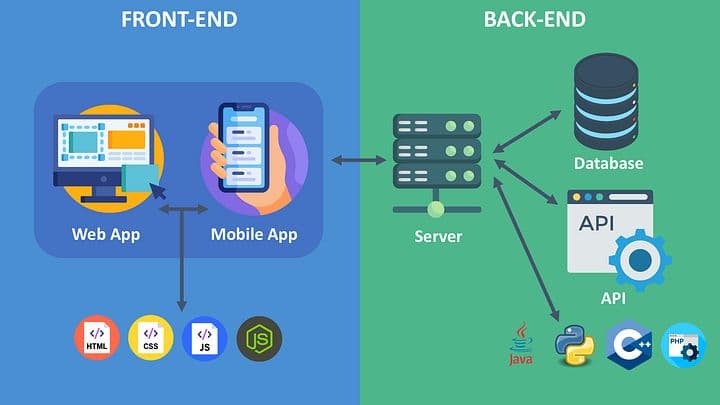
At the same time, get a basic understanding of how digital products are built. You don’t need to become a developer, but knowing how websites and apps are structured will help you design things that are actually realistic to build.
Learn the Tools But Use Them With Purpose
Once your thinking improves, tools start to make sense.
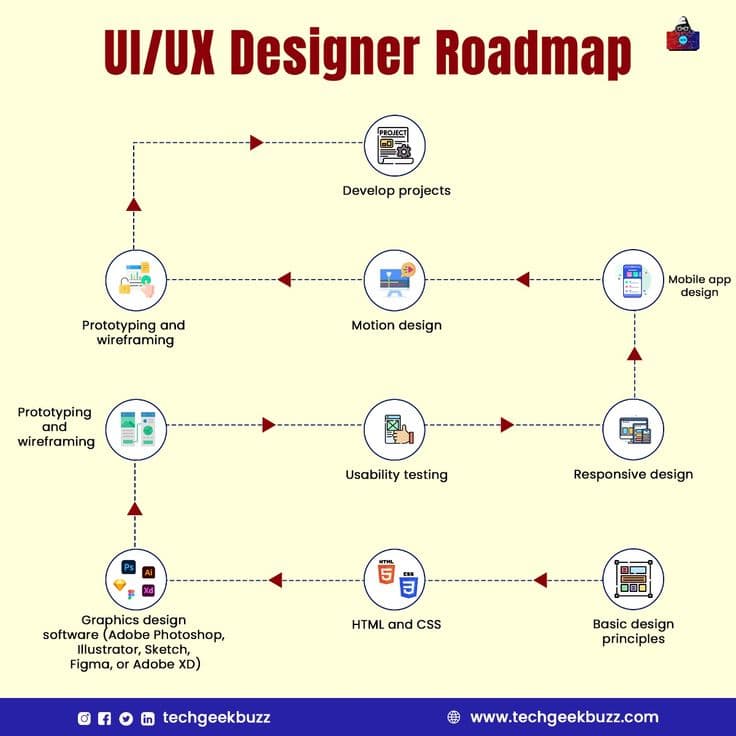
Figma has become the industry standard for UI/UX design, and for good reason. It allows you to design interfaces, create prototypes, and collaborate all in one place.
But the goal isn’t to “learn Figma.” The goal is to use it to solve problems.
Start simple. Design a login page. Then a dashboard. Then a small mobile app. Focus on clarity, not complexity. A clean, simple design that works is far more valuable than a flashy one that confuses users.
At this stage, you should also begin working with wireframes basic layouts that focus on structure before visuals. This trains you to prioritize usability over aesthetics.
Master the UX Process (This Is What Sets You Apart)
Most beginners stop at making things look good. That’s why many never get hired.
Real UI/UX designers follow a process.
It starts with understanding the problem. Who are the users? What are they trying to achieve? Where are they struggling?
From there, you move into structuring solutions—user flows, journeys, and wireframes that map out how someone moves through a product.
Only after that do you design the interface.
And even then, you test. You observe how people interact with your design and refine it.
When you start practicing this process—even on small personal projects—you immediately stand out from beginners who only focus on visuals.
Build a Portfolio That Actually Gets Attention
Your portfolio is not a gallery. It’s proof of how you think.
Recruiters and clients are not just looking at your final screens. They want to see how you approached the problem, what decisions you made, and why.
Instead of dumping designs, structure each project as a case study.
Explain the problem clearly. Show your research or assumptions. Walk through your process—wireframes, iterations, and decisions. Then present the final design.
Three to five solid projects are enough if they’re done properly. One strong case study is better than five shallow ones.
If you’re stuck on ideas, start with real-world problems around you. Redesign a confusing government service. Improve a local business website. Simplify a booking process. These projects feel more authentic and practical.
Learn Basic Frontend (It Will Give You an Edge)
You don’t need to become a developer, but understanding HTML and CSS at a basic level will completely change how you design.
You’ll stop creating unrealistic layouts. You’ll understand spacing, responsiveness, and constraints. And most importantly, developers will take you more seriously.
In markets like Kenya, where startups often expect designers to wear multiple hats, this can be the difference between getting hired or overlooked.
Start Earning Before You Feel “Ready”
A lot of beginners wait too long. They keep learning, watching tutorials, and refining designs—but never step into the real market.
You don’t need to be perfect to start earning.
Begin small:
Design for a friend’s business
Offer simple redesign services
Take on small freelance gigs
Collaborate with developers on projects
The goal is to gain experience working with real constraints, real feedback, and real expectations.
That’s where actual growth happens.
Common Mistakes That Slow Beginners Down
There are patterns you’ll notice if you look at people who struggle to break into UI/UX:
They focus too much on tools and not enough on thinking.
They copy designs without understanding the reasoning behind them.
They avoid feedback and work in isolation.
They build portfolios that look good but explain nothing.
Avoid these, and you’ll move faster than most.
What the Career Path Looks Like
UI/UX design is not a fixed path, but there’s a general progression:
You start as a beginner building foundational skills.
Then move into junior roles or freelance work.
With experience, you become a mid-level designer handling more complex projects.
Eventually, you can specialize (UX research, product design) or move into senior and leadership roles.
Income grows with your ability to solve bigger problems, not just make things look better.
Final Thoughts
UI/UX design is one of the few careers where your background matters less than your ability to think, solve problems, and communicate ideas clearly.
You don’t need a perfect plan. You need consistent action.
Start with understanding users.
Practice with real problems.
Build a portfolio that shows your thinking.
And step into the market earlier than you think you should.
If you follow that path with discipline, you won’t just learn UI/UX—you’ll position yourself as someone companies actually want to hire.